Multifamily Apartment Maintenance Work Order Software
Take the frustration out of multifamily work order management with Zego’s property management maintenance work order software that automates workflows to help residents and staff.
An intuitive work order app that works for you
Give your residents peace of mind knowing their apartment work order issue is in the right hands. With Zego Mobile Doorman, they can easily submit and automatically track service requests through their community-branded resident experience app. Our user-friendly apartment maintenance work order software takes the stress out of incomplete work order requests, enabling you to manage requests across multiple properties and improve the overall experience for your multifamily community.
A get-it-done multifamily work order solution designed for residents & property staff
-
Manage all your properties with one comprehensive solution
Work order management can be used as a standalone solution for maintenance tasks, or it can be integrated with your existing software for seamless operations.
-
Make submitting service requests painless
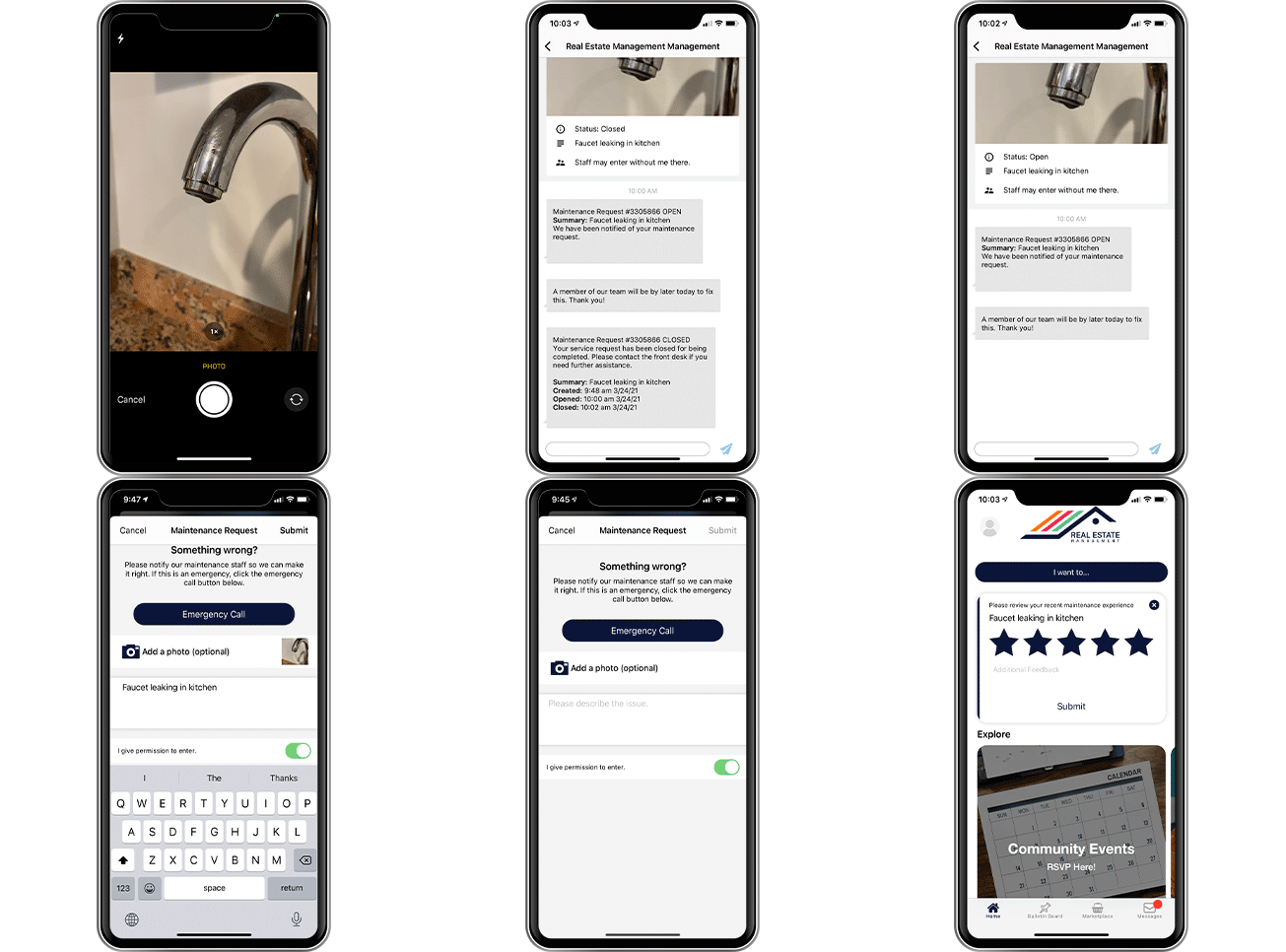
Residents can submit requests and view status updates right from the mobile work order app. On-site associates can submit and manage work orders via the staff web portal.
-
Assign, filter, & view all property requests
Work orders can be searched and filtered by unit and status (i.e. new, open, closed) for simplified management.
-
Notify residents using their preferred method of communication
Residents can choose their preferred communication method (push, text, and/or email) for updates, and on-site associates are notified through email and in-app push notifications.
Better work order management with less work for all
Empower your staff with the tools they need to effectively manage work orders across properties with Zego's Mobile Doorman work order management automation app.
How it works
1. Residents submit a request
Residents submit a maintenance request through the Zego work order app or online.
2. You receive a notification
Associates are notified with all details of the maintenance work order, such as name, unit, issue category, and photo.
3. Associates manage the request
Associates can filter, view, accept, and manage work orders by status (new, open, closed).
4. Residents get automatic updates
Residents are automatically kept up to date via custom alerts on the progress and completion of the work order.
Action Items
Get all the details you need to get the job done
Through the app, residents can enter in all the information you need to get the work order started, including name, unit, category & issue type, description of issue, photos, entry permission, and more!
Communicate seamlessly with residents
Associates can use a chat feature that’s embedded into each work order for easy communication with the resident if needed. Notifications are sent to residents and admin users based on user preferences.
Gain insights through the admin portal
Once detailed requests are submitted, associates can begin the work order. With a dashboard view, admins can review open and in-process apartment service requests and easily navigate at the property or unit level.
Chat with a Zego expert
Become another Zego success story with our property management automation technology and that simplifies work order management for residents and staff. See how with a customized demo.
See what our clients have to say
-
Zego- Paylease
Read more reviews[Residents] are [...] able to communicate with us using the Mobile Doorman app. [...] Most residents enjoy the ability send pictures with their requests, where other apps do not have the capability.
-
Zego - Mobile Doorman
Read more reviewsZego - Mobile Doorman has given us a great way to exchange communication with our residents. This gives our residents a great pathway to reach out to our leasing office about rent payment issues, maintenance issues, packages and any safety concerns.
-
Enhanced Community Living with Zego/Mobile Doorman
Read more reviewsThe Mobile Doorman resident app has proven to be an invaluable tool for our property management team, significantly improving resident satisfaction and operational efficiency.
FAQ's about work order software for multifamily
A maintenance request app is a digital platform that allows residents to submit, track, and communicate about apartment maintenance issues directly from their smartphones. Residents can report problems with photos, descriptions, and entry permissions through a community-branded mobile app, eliminating the need for phone calls or office visits. The app automatically tracks the status of each request and keeps residents informed throughout the repair process.
Property management work order software follows a four-step process. First, residents submit maintenance requests through the app with details like issue category, photos, and unit information. Next, on-site teams receive instant notifications with all request details. Associates then manage requests through a dashboard where they can filter, assign, and update work order status. Finally, residents automatically receive updates via their preferred communication method. The system includes an embedded chat feature for seamless communication between residents and staff when clarification is needed.
A work order system centralizes maintenance management across multiple properties in one dashboard, providing complete request details including photos and entry permissions upfront. This improves organization by allowing managers to filter and search work orders by unit, status, and property. Automated notifications and in-app messaging enhance communication while eliminating incomplete requests and manual tracking saves significant time. The dashboard analytics also help identify maintenance trends for better operational decisions.
The software empowers onsite teams with instant notifications when new requests arrive and provides a comprehensive dashboard to view, filter, and prioritize work orders. Staff can submit work orders on behalf of residents through the web portal and communicate directly through embedded chat features. By enabling seamless management across multiple properties from a single platform, the system reduces administrative burden so teams can focus on completing repairs rather than managing paperwork.